
Wi-Fi 7 Preamble Puncturing Explained: Real-World Speed Gains
Wi-Fi 7 Preamble Puncturing allows an access point to surgically slice out a narrow 20 MHz or 40 MHz chunk of interference inside an ultra-wide 160 MHz or 320 MHz channel while continuing to transmit across the remaining clean spectrum. Unlike Wi-Fi 6 which dropped entire channels in half, Wi-Fi 7 preserves over 85% of multi-gigabit throughput.
- End of the 50% Fallback Penalty: In Wi-Fi 5 and Wi-Fi 6, any interference inside a 160 MHz channel forced the router to abandon the entire upper block and drop down to 80 MHz.
- Surgical Spectrum Slicing: Wi-Fi 7 (802.11be) punctures only the specific 20 MHz or 40 MHz channel containing radar or a neighbor's beacon, keeping 140 MHz or 280 MHz actively transmitting.
- Multi-Resource Units (MRU): Enabled by MRU technology in the PHY layer, allowing single clients to receive non-contiguous frequency tone blocks simultaneously.
- Automatic Activation: Preamble puncturing operates dynamically in certified Wi-Fi 7 clients (Qualcomm FastConnect 7800, Intel BE200, MediaTek Filogic) without manual SSID configuration.
The Historical Bandwidth Trap: Why Wi-Fi 5 and Wi-Fi 6 Collapsed on Wide Channels
To achieve gigabit wireless throughput, modern Wi-Fi routers bond multiple contiguous 20 MHz radio channels together into wider blocks: 40 MHz, 80 MHz, 160 MHz, and now 320 MHz in Wi-Fi 7. However, under the legacy IEEE 802.11ac (Wi-Fi 5) and 802.11ax (Wi-Fi 6) standards, these bonded channels were governed by an unforgiving all-or-nothing contiguous spectrum rule.
If you configured your router for a wide 160 MHz channel on the 5 GHz band (spanning channels 36 through 64), the primary 20 MHz channel (Ch 36) had to remain completely clear, and all three secondary 20 MHz blocks, plus the secondary 80 MHz block (Ch 52–64), had to be clean. If a neighbor's router pulsed a weak beacon on Channel 52, or if a weather radar pulse triggered Dynamic Frequency Selection (DFS), the legacy router could not ignore that single channel. It was forced to discard the entire 80 MHz secondary block, instantly halving channel bandwidth from 160 MHz down to 80 MHz.
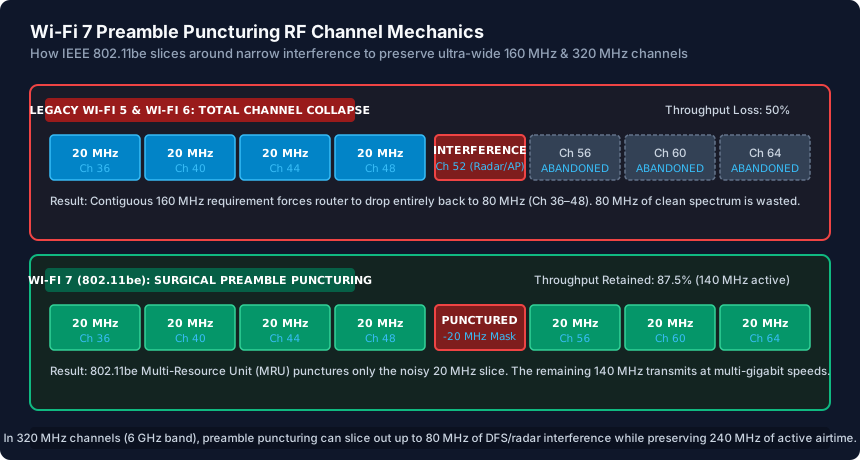
In high-density apartment complexes and urban neighborhoods, this limitation rendered 160 MHz channels practically unusable on 5 GHz. Users who purchased flagship Wi-Fi 6 routers regularly found their devices throttled to 80 MHz speeds within hours of booting up.
How IEEE 802.11be Multi-Resource Units (MRU) Puncture Spectrum
While an optional, rudimentary form of preamble puncturing was introduced in the draft 802.11ax standard, it was rarely implemented by consumer client chipsets and suffered from severe tone-mapping restrictions. IEEE 802.11be (Wi-Fi 7) makes preamble puncturing mandatory and introduces Multi-Resource Units (MRUs) to solve the underlying mathematical PHY bottleneck.
In Orthogonal Frequency Division Multiple Access (OFDMA), the wireless channel is divided into subcarriers grouped into Resource Units (RUs)—ranging from 26 tones (2 MHz) up to 996 tones (80 MHz) and 2x996 tones (160 MHz). Wi-Fi 6 enforced a rigid rule: a single client device could only be allocated a single contiguous RU block per transmission burst.
Wi-Fi 7 breaks this constraint with MRUs. The 802.11be PHY layer allows combining non-contiguous RU blocks to feed a single client. For example, in a 160 MHz channel where Channel 52 is punctured:
- The router creates an MRU consisting of a 3x242-tone RU + 996-tone RU.
- The 242-tone block on Channel 52 is zeroed out (masked with null subcarriers in the physical preamble).
- The Wi-Fi 7 radio transmits user data across Channel 36, 40, 44, 48, 56, 60, and 64 concurrently.
The transmitting access point and receiving client maintain an active 140 MHz composite channel, delivering 87.5% of total theoretical PHY throughput instead of dropping to 50%.
Real-World Throughput Gains in Dense Apartment Environments
The practical advantage of preamble puncturing becomes overwhelmingly apparent when testing real-world local network file transfers in urban residential buildings. Consider an apartment surrounded by 14 neighboring access points where Channel 40 is intermittently occupied by a smart TV and Channel 104 is occupied by an office printer:
- Under Wi-Fi 6 (160 MHz Mode): The access point detects carrier activity on Channel 40. Unable to use Ch 36–48 cleanly, it either drops to an 80 MHz channel in the DFS band (which is then interrupted by Ch 104) or falls back to an unbonded 40 MHz channel. Real-world iperf3 TCP throughput plummets from 1,750 Mbps down to 420 Mbps.
- Under Wi-Fi 7 (160 MHz Mode with Puncturing): The access point punctures Channel 40. It transmits simultaneously across 140 MHz of clear airtime. The client maintains an 802.11be PHY link rate of ~2,400 Mbps, sustaining real-world iperf3 TCP throughput of 1,480 Mbps.
In the new 6 GHz spectrum unlocked by Wi-Fi 6E and Wi-Fi 7, channels can be bonded up to a massive 320 MHz width (e.g., Channels 33 through 93). In 320 MHz mode, puncturing allows an access point to punch out up to 80 MHz of legacy low-power indoor (LPI) or Fixed Satellite Service (FSS) incumbents while still delivering a blazing 240 MHz transmission pipe.
Hardware Requirements and Router Firmware Verification
To benefit from preamble puncturing, both the transmitting wireless access point and the client device must support IEEE 802.11be. If a Wi-Fi 6 client (such as an iPhone 14 or Intel AX210) connects to a Wi-Fi 7 router that is currently puncturing a channel, the router dynamically creates an unpunctured legacy sub-channel for that specific client, ensuring backward compatibility without breaking connection stability.
When shopping for Wi-Fi 7 hardware or configuring router firmware (Asuswrt, UniFi Network, TP-Link Omada), look for these verified chipset implementations:
- Qualcomm: Networking Pro Series (1220, 1620) and FastConnect 7800 client radios natively support both Multi-Link Operation (MLO) and full preamble puncturing masks.
- Broadcom: BCM6726 / BCM4398 chipsets support automated 20/40/80 MHz puncturing across 5 GHz and 6 GHz bands.
- Intel: The Intel BE200 Wi-Fi 7 M.2 PCIe adapter supports full MRU puncturing under Windows 11 and Linux kernel 6.6+.
In router management interfaces, preamble puncturing is generally enabled by default under Wireless > Professional / Advanced > 802.11be Features. Unlike DFS which requires 60-second Channel Availability Check (CAC) silence periods, preamble puncturing occurs in under 4 microseconds during the physical preamble sync burst.
Wi-Fi Generation Handling of RF Interference & Channel Fallback
| Wi-Fi Standard | Channel Width | Interference Handling | Fallback Penalty | Real-World Throughput Recovery | Puncturing Support |
|---|---|---|---|---|---|
| Wi-Fi 5 (802.11ac) | 20 / 40 / 80 / 160 MHz | Contiguous mandatory | Drops 160MHz to 80MHz (50% loss) | Poor (~400 Mbps) | None (Unsupported) |
| Wi-Fi 6 (802.11ax) | 20 / 40 / 80 / 160 MHz | Contiguous mandatory | Drops 160MHz to 80MHz (50% loss) | Moderate (~600 Mbps) | Optional draft (Rarely supported by clients) |
| Wi-Fi 6E (802.11ax 6GHz) | Up to 160 MHz | Contiguous mandatory in 6GHz | Drops to 80MHz upon incumbent | Moderate (~800 Mbps) | Optional draft (Client support minimal) |
| Wi-Fi 7 (802.11be 5GHz) | Up to 160 MHz | Surgical 20MHz/40MHz Puncturing | Zero drop (Punctures interference) | Outstanding (1,400+ Mbps) | Mandatory PHY standard |
| Wi-Fi 7 (802.11be 6GHz) | Up to 320 MHz | Slices up to 80MHz of noise | Preserves 240MHz ultra-wide pipe | Extreme (2,500+ Mbps) | Mandatory PHY standard with MRU |
Wi-Fi 7 Preamble Puncturing Verification Checklist
- Verify router and access point support true IEEE 802.11be with active Wi-Fi 7 certification.
- Ensure client devices utilize Wi-Fi 7 radios (Intel BE200, Qualcomm FastConnect 7800, MediaTek MT7925).
- Set 5 GHz channel bandwidth to 160 MHz and 6 GHz channel bandwidth to 320 MHz in router settings.
- Check that 802.11be / Wi-Fi 7 feature toggles are enabled under router advanced wireless settings.
- Use a Wi-Fi analyzer tool (WiFiman, inSSIDer) to confirm the primary channel remains on clean spectrum.
- Verify Windows 11 (24H2 or newer) or Linux Kernel 6.6+ is installed to ensure OS-level 802.11be MRU driver support.
Frequently Asked Questions
What is the main difference between Wi-Fi 6 and Wi-Fi 7 channel width handling?
Wi-Fi 6 requires wide channels (80 MHz or 160 MHz) to be 100% contiguous and free of interference. If a 20 MHz segment has radar or a neighbor's signal, Wi-Fi 6 drops the entire channel in half. Wi-Fi 7 uses Preamble Puncturing to mask out only the noisy 20 MHz slice while continuing to transmit across the rest of the channel.
Does preamble puncturing work if my laptop only has a Wi-Fi 6 or Wi-Fi 5 card?
No. Preamble puncturing requires both the access point and the client device to understand 802.11be Multi-Resource Unit (MRU) physical headers. For legacy Wi-Fi 5 and Wi-Fi 6 clients, the Wi-Fi 7 router automatically negotiates standard contiguous 40 MHz or 80 MHz sub-channels.
Does preamble puncturing help avoid DFS radar shutoffs?
Yes! In regions where weather or airport radar operates on specific DFS channels (such as Ch 52 or Ch 120), a Wi-Fi 7 router can puncture that exact frequency slice instead of shutting down the entire 5 GHz radio or switching channels.
Do I need to enable preamble puncturing manually in my router settings?
In most commercial Wi-Fi 7 routers (ASUS, UniFi, Netgear, TP-Link), preamble puncturing is enabled automatically in hardware firmware whenever 802.11be / Wi-Fi 7 mode is active on 160 MHz or 320 MHz channels.
Related WiFi Setup & Engineering Guides
- WiFi Channel Planning Guide (2.4 GHz, 5 GHz & 6 GHz) — Plan non-overlapping WiFi channels on 2.4 GHz (1, 6, 11), 5 GHz (UNII-1, UNII-3, DFS), and 6 GHz. Stop adjacent-channel interference across multi-AP setups.
- How to Configure WiFi for Speed and Stability — Optimize router WiFi settings for speed and stability: set 20/80/160 MHz channel widths, choose WPA2-AES or WPA3-SAE, and tune 2.4/5/6 GHz transmit power.
- How to Fix Random WiFi Drops and Disconnects — Diagnose and fix random WiFi drops: stop 5 GHz DFS radar channel dumps, extend short DHCP lease timers, disable buggy Airtime Fairness, and fix roaming flaps.
- Guest WiFi Setup Guide for Homes and Offices — Set up a secure Guest WiFi network for homes and small offices: enable AP client isolation, block intranet LAN access, cap bandwidth, and isolate IoT devices.