
Netgear MS510TXM vs QNAP QSW-M2108R-2C: Multi-Gig Switch Comparison
The Netgear MS510TXM ($479) is a 140 Gbps smart switch featuring four 2.5G ports, four multi-gig 10G copper ports, and dual 10G SFP+ cages. The QNAP QSW-M2108R-2C ($449) delivers eight 2.5GbE ports and dual 10G SFP+/copper combo ports in a whisper-quiet, half-width 1U rackmount chassis.
- 10G Copper Density: Netgear MS510TXM features 4 native 10GBASE-T multi-gig copper ports; QNAP relies on 2 combo ports (SFP+ or 10G copper).
- 2.5GbE Client Density: QNAP QSW-M2108R-2C provides 8 dedicated 2.5GbE ports, perfect for modern Wi-Fi 7 APs and multi-gig workstations.
- Form Factor Innovation: QNAP's half-width 1U design allows two switches (or a switch and a half-width QNAP NAS) to mount side-by-side in a single 19-inch rack unit.
- Acoustics & Thermals: QNAP operates significantly quieter (~21 dBA) thanks to cool-running SFP+ combo interfaces, whereas Netgear's 10G copper ports generate more fan noise (~35 dBA).
Multi-Gigabit Port Architecture: 10GBASE-T Copper vs 2.5G Density
In modern homelabs, video post-production suites, and SMB server closets, 1GbE switching is an obsolete bottleneck. High-speed NVMe Network Attached Storage (TrueNAS, Synology, QNAP) and Wi-Fi 7 access points require a hybrid mix of 2.5GbE client ports and 10GbE aggregation backbones.
The Netgear MS510TXM and the QNAP QSW-M2108R-2C target this exact $450 prosumer bracket, but configure their multi-gigabit switching silicon differently:
- Netgear MS510TXM (Heavy 10G Copper): Features four 1G/2.5G ports, four Multi-Gig 1G/2.5G/5G/10GBASE-T copper ports, and two dedicated 10G SFP+ fiber cages (10 total ports). It provides a massive 140 Gbps non-blocking switching fabric. You can connect up to four high-speed workstations over standard Cat6a copper at full 10 Gbps speeds without purchasing expensive SFP+ transceivers.
- QNAP QSW-M2108R-2C (High 2.5G Density): Features eight dedicated 2.5GbE RJ45 ports plus two 10GbE SFP+/RJ45 combo ports (10 total ports) backed by an 80 Gbps switching fabric. It is tailored for environments connecting multiple 2.5GbE access points, gaming rigs, and PCs, utilizing the dual 10G combo ports strictly for dual-port NAS uplinks.
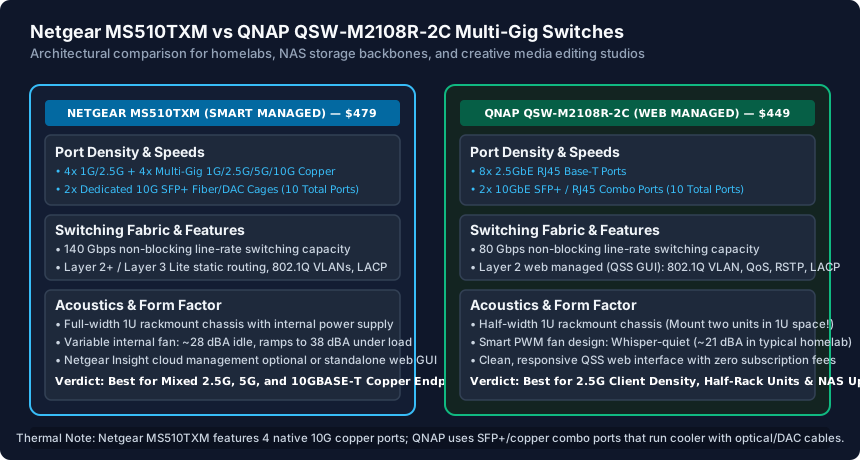
If your studio has four editing PCs with 10GBASE-T cards, the Netgear MS510TXM handles them natively. If your office has eight 2.5G workstations and one central 10G NAS, the QNAP is the superior match.
Thermal Dissipation, Power Consumption and Fan Acoustics
10GBASE-T copper interfaces generate substantial thermal dissipation—consuming approximately 2.5W to 4W of electrical power per port compared to under 0.7W for a 10G SFP+ Direct Attach Copper (DAC) cable. This difference directly impacts cooling fan noise and home office usability.
The Netgear MS510TXM houses four high-power 10G copper physical layer chips (PHYs) inside a full-width metal 1U chassis. Under moderate traffic load, its internal PWM cooling fan spins between 2,800 and 4,500 RPM, producing an acoustic sound pressure level of 32 dBA to 38 dBA. While acceptable inside a server rack or basement closet, it is clearly audible if placed on an open desk or in a quiet recording studio.
The QNAP QSW-M2108R-2C runs dramatically cooler. By utilizing 2.5GbE on its eight client ports and offering optical SFP+ on its 10G combo interfaces, overall board power draw is capped at just 36W maximum. Its intelligent variable-speed smart fan operates at a whisper-quiet 21 dBA at idle and rarely exceeds 26 dBA under sustained multi-gigabit transfers. You can comfortably sit two feet away from the QNAP switch all day without acoustic fatigue.
Form Factor & Rack Ergonomics: Full-Width 1U vs Half-Width Modular Rack
Physical mounting flexibility is an area where QNAP delivers clever hardware innovation. The QSW-M2108R-2C is built in a half-width 1U rackmount chassis (measuring just 8.15 inches wide). Using QNAP's dual-unit rackmount tray kit, you can mount:
- Dual Multi-Gig Switches: Two QSW-M2108R switches side-by-side in a single 1U slot, yielding 16x 2.5G ports and 4x 10G ports in just 1.75 inches of vertical rack height.
- Switch + NAS Combo: Mount the QSW switch side-by-side with a half-width QNAP NAS (such as the TS-435XeU short-depth 1U rackmount NAS) for the ultimate compact mobile AV production cart.
The Netgear MS510TXM is a standard full-width 19-inch 1U rackmount switch (measuring 13 inches deep). It includes standard rack ears and rubber desktop feet. It occupies the entire horizontal width of your rack, leaving no room for side-by-side accessory integration.
Layer 2 Management Software: Netgear Smart Managed Pro vs QNAP QSS
Both devices function as true Layer 2 managed switches, but their management ergonomics reflect different design priorities:
- QNAP QSS (QNAP Switch System): Features a clean, highly modern HTML5 web GUI. It includes visual graphical port status diagrams, intuitive 802.1Q VLAN configuration (Port-based and Tagged), Link Aggregation (LACP), Quality of Service (QoS), Loop Protection, and IGMP Snooping v2/v3. It is fast, responsive, and completely standalone with zero cloud dependencies.
- Netgear Smart Managed Pro: Offers an extensive legacy enterprise web management interface. In addition to standard Layer 2 switching, it includes Layer 2+ / Layer 3 Lite static routing (allowing the switch to route inter-VLAN traffic locally without sending packets back up to your firewall). It also offers optional Netgear Insight cloud management for remote multi-site monitoring.
Choose the Netgear MS510TXM if: You need multiple 10GBASE-T copper ports for workstations, require Layer 3 static routing between VLANs, and have an isolated rack enclosure where 35 dBA fan noise is not an issue.
Choose the QNAP QSW-M2108R-2C if: You want maximum 2.5GbE port density (8 ports) for client devices, need a whisper-quiet switch for your home office desk, and love the space-saving half-width 1U modular form factor.
Netgear MS510TXM vs QNAP QSW-M2108R-2C Hardware Comparison
| Specification / Metric | Netgear MS510TXM | QNAP QSW-M2108R-2C | Advantage |
|---|---|---|---|
| MSRP Price | $479 | $449 | QNAP ($30 lower cost) |
| Total Port Count | 10 Ports (8 Copper + 2 SFP+) | 10 Ports (8 Copper + 2 Combo) | Tie (Both offer 10 ports) |
| 2.5GbE RJ45 Ports | 4 Ports (1G/2.5G) | 8 Ports (100M/1G/2.5G) | QNAP (Double the 2.5G client ports) |
| 10GBASE-T Copper Ports | 4 Ports (1G/2.5G/5G/10G) | 2 Ports (via Combo cages) | Netgear (Dedicated 10G copper) |
| 10G SFP+ Fiber Cages | 2 Dedicated 10G SFP+ cages | 2 Combo SFP+/RJ45 ports | Netgear (Dedicated cages) |
| Switching Fabric | 140 Gbps non-blocking | 80 Gbps non-blocking | Netgear (Higher backplane capacity) |
| L3 Static Routing | Yes (Layer 3 Lite IPv4/IPv6) | No (Layer 2 managed only) | Netgear (Inter-VLAN switch routing) |
| Acoustics / Noise Level | 32 dBA – 38 dBA (Moderate fan) | 21 dBA – 26 dBA (Whisper quiet) | QNAP (Much quieter for desks) |
| Rack Form Factor | Standard full-width 1U (19-inch) | Half-width 1U (Mount 2 in 1U space) | QNAP (Space-saving half-rack) |
Multi-Gig Switch Installation & Setup Checklist
- Verify cable grade: Ensure solid Cat6 or Cat6a cabling is installed for 10GBASE-T runs over 35 meters.
- Select appropriate 10G SFP+ DAC cables for short switch-to-NAS links under 3 meters to eliminate transceiver heat.
- Assign a static IP address to the switch management interface within your designated Management VLAN.
- Configure 802.1Q tagged and untagged VLAN memberships across all client and trunk ports.
- Enable 802.3ad LACP Link Aggregation if bonding dual 2.5GbE or 10GbE interfaces to your NAS storage array.
- Enable IGMP Snooping v2/v3 to prevent smart home multicast video streams from flooding all switch ports.
Frequently Asked Questions
What is a 10G combo port on the QNAP QSW-M2108R-2C?
A combo port gives you two physical jacks (one RJ45 10G copper port and one SFP+ optical cage) for a single switch channel. You can plug into either the RJ45 jack or the SFP+ cage, but you cannot use both simultaneously for that specific port number.
Can I use standard Cat5e cables with these 2.5GbE and 10GbE switches?
For 2.5GbE speeds, standard Cat5e works reliably up to the full 100-meter (328 ft) distance. However, for 10GbE speeds, Cat5e is not supported; you need high-quality Cat6 (for runs up to 35–55 meters) or Cat6a (for full 100-meter runs).
Does the Netgear MS510TXM require a paid Netgear Insight subscription?
No. The MS510TXM includes a complete standalone local web management GUI accessible directly by entering the switch's IP in your browser. Netgear Insight cloud management is purely optional for remote multi-site MSP monitoring.
Can I connect an SFP+ port on the Netgear to an SFP+ port on the QNAP using a DAC cable?
Yes! Direct Attach Copper (DAC) passive SFP+ cables are universally standardized under SFF-8431. A generic passive SFP+ DAC cable (such as from 10Gtek or FS.com) will link the Netgear and QNAP switches at 10 Gbps with sub-microsecond latency and zero transceiver heat.
Related Best Switches & Engineering Guides
- 802.3ad LACP Link Aggregation Setup Guide for Switches & NAS — Learn how to configure IEEE 802.3ad LACP link aggregation on UniFi, TP-Link Omada, and Netgear switches, plus why LACP vs SMB3 Multichannel differs for a NAS.
- NAS Network Setup Guide for Home and Small Office — Configure a Synology, QNAP, or TrueNAS server with DHCP reservations, 2.5GbE/10GbE switching, SMB3 multichannel vs LACP, and WireGuard/Tailscale access.
- PoE Switch Guide for Small Offices (802.3af/at/bt) — Master Power over Ethernet for small offices: compare IEEE 802.3af PoE, 802.3at PoE+, and 802.3bt PoE++, calculate watt budgets, and avoid 24V Passive PoE.
- Ubiquiti UniFi vs TP-Link Omada: Small Office SDN Compared — Compare Ubiquiti UniFi vs TP-Link Omada for small offices and prosumer homes: PoE switches, WiFi 7 ceiling APs, VLAN firewall rules, and controller costs.