
Wi-Fi BSS Coloring & Spatial Reuse: Stop Co-Channel Lag
BSS Coloring assigns a 6-bit numerical color identifier (1–63) to every Wi-Fi frame's physical header, allowing access points to instantly distinguish between their own network's traffic and a neighbor's co-channel signal. Paired with Spatial Reuse, routers transmit concurrently without waiting for neighbor silence, eliminating lag in crowded apartment buildings.
- The CSMA/CA Wait Problem: Legacy Wi-Fi treats any detected radio energy above -82 dBm as channel busy, forcing devices to wait even if the signal is from a weak neighbor 50 feet away.
- 6-Bit Numerical Color Tags: BSS Coloring marks every frame with a tag from 1 to 63 in the PHY preamble, decoded by receivers in under 4 microseconds.
- Spatial Reuse (OBSS-PD): When a router detects an Overlapping BSS (OBSS) frame with a different color, it raises its clear channel threshold to -62 dBm and transmits simultaneously.
- Zero Manual Configuration: BSS Coloring is completely autonomous; routers negotiate colors with neighbors during boot and change colors automatically if a clash occurs.
The Co-Channel Interference Crisis: Why CSMA/CA Fails in Dense Housing
For over two decades, Wi-Fi has relied on the Carrier Sense Multiple Access with Collision Avoidance (CSMA/CA) protocol. Before any Wi-Fi device—whether an access point, iPhone, or laptop—transmits a data packet, it must execute Clear Channel Assessment (CCA). It listens to the radio frequency airwaves for energy.
Under legacy Wi-Fi 4 (802.11n) and Wi-Fi 5 (802.11ac), if a device detected any readable 802.11 preamble with a signal strength above -82 dBm (which is an extraordinarily faint whisper), it was legally required to assume the entire channel was busy. The device set a random exponential backoff timer and waited in dead silence.
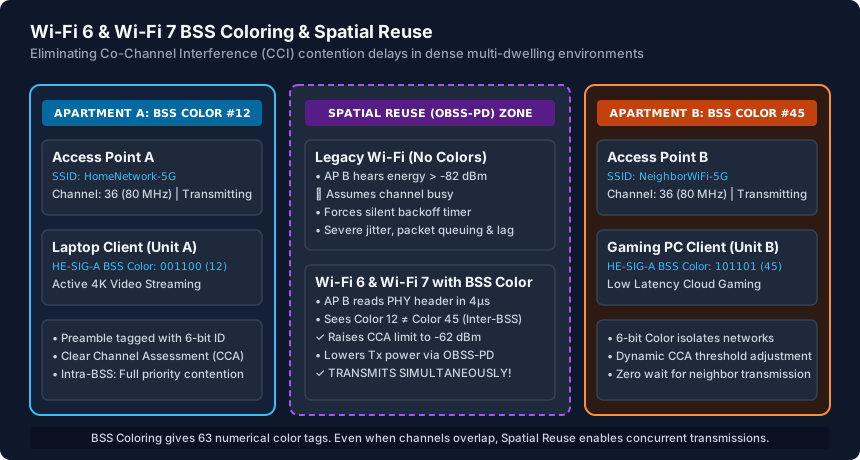
In modern multi-dwelling apartment complexes, condos, and high-density office parks, dozens of access points are forced to share the same non-overlapping 5 GHz channels (Channels 36, 44, 48, 149, 157). Because access points could hear faint signals from neighbors through drywall and floors, they spent 60% to 80% of their airtime waiting for other people's packets to finish, resulting in crippling bufferbloat, jitter, and gaming lag spikes.
Anatomy of BSS Coloring: The 6-Bit PHY Header Identifier
Introduced in IEEE 802.11ax (Wi-Fi 6) and refined in 802.11be (Wi-Fi 7), Basic Service Set (BSS) Coloring provides an elegant solution. The standard embeds a 6-bit numerical color identifier (yielding 63 unique color numbers from 1 to 63) directly into the High Efficiency (HE) and Extremely High Efficiency (EHE) physical preamble header (specifically the HE-SIG-A field).
When an 802.11ax/be receiver senses incoming RF energy, it decodes the physical preamble in under 4 microseconds before reading the bulk payload. It performs an immediate classification:
- Intra-BSS Frame (My Color): The frame carries the same color number as the local network. The device respects normal CSMA/CA rules, backing off to prevent collisions with family members or local office devices.
- Inter-BSS Frame (Alien Color): The frame carries a different color number originating from an Overlapping BSS (OBSS) neighbor. The receiver recognizes that this traffic belongs to an unrelated network and hands the signal off to the Spatial Reuse engine.
If two neighboring routers accidentally boot up and select the same color number (a color collision), the access point detects duplicate color usage from client beacons and autonomously shifts to an unused color between 1 and 63 without disconnecting clients.
Spatial Reuse and OBSS Packet Detection (OBSS-PD) Mechanics
BSS Coloring by itself is merely an identification tag; the real performance breakthrough comes from Spatial Reuse via Overlapping BSS Packet Detection (OBSS-PD). Once an access point identifies an incoming transmission as an alien inter-BSS frame, it modifies its Clear Channel Assessment sensitivity.
Instead of freezing transmission at the legacy -82 dBm threshold, the router raises its energy detection threshold up to -62 dBm (a 20 dB increase, representing a 100-fold difference in RF energy tolerance). If the neighbor's transmission is weaker than -62 dBm, the router declares the channel clear and transmits simultaneously!
To ensure this concurrent transmission does not overpower the neighbor's client, the 802.11ax/be standard enforces strict Transmit Power Control (TPC). The router dynamically scales back its output wattage using the formula:
TX_PWR = TX_PWR_MAX - (OBSS_PD_LEVEL - OBSS_PD_MIN)By lowering transmit power just enough to satisfy the local living room client, both apartments transmit gigabit streams on Channel 36 at the exact same fraction of a second without corrupting each other's data frames.
Client Compatibility and Troubleshooting Urban Interference
BSS Coloring functions as a collaborative Layer-1 physical standard. To achieve full spatial reuse benefits, both the access point and client hardware must support Wi-Fi 6 or Wi-Fi 7. When legacy Wi-Fi 5 or Wi-Fi 4 devices connect to a Wi-Fi 6 router, the access point must still honor legacy CSMA/CA backoff rules for those specific legacy packets, slightly lowering overall airtime efficiency.
You can verify BSS Color operation and identify color collisions using enterprise wireless diagnostic tools like Wireshark with an AirPcap adapter, or using macOS Wireless Diagnostics:
- Open Wireshark and filter for
wlan.fixed.he_sig_a.bss_color. - Inspect beacon frames emitted by your router; you will see an integer value (e.g.,
BSS Color: 14). - Inspect surrounding neighbor beacons to ensure neighboring BSSIDs on your channel are using distinct color numbers.
In commercial router software (UniFi Network, Omada, Asuswrt-Merlin), BSS Coloring is enabled by default. If your apartment suffers from mysterious Wi-Fi slowdowns during evening peak hours, ensuring your primary devices connect via Wi-Fi 6 (802.11ax) or Wi-Fi 7 (802.11be) will immediately bypass neighbor airtime contention through Spatial Reuse.
Legacy CSMA/CA Contention vs BSS Colored Spatial Reuse Matrix
| Metric / Parameter | Legacy Wi-Fi (802.11a/b/g/n/ac) | Wi-Fi 6 & Wi-Fi 7 (802.11ax/be) | Real-World User Impact |
|---|---|---|---|
| Clear Channel Threshold | -82 dBm (Extremely sensitive) | -62 dBm (OBSS-PD Spatial Reuse) | Routers no longer freeze for distant neighbor traffic |
| Concurrent Transmissions | Forbidden on same channel | Allowed if BSS colors differ | Dramatically cuts latency & bufferbloat in apartments |
| Preamble Classification Time | Full frame decode (~20–40 µs) | 4 µs (HE-SIG-A header) | Immediate transmission decision with zero delay |
| RF Airtime Efficiency | 20%–40% in dense buildings | 75%–90% in dense buildings | Multi-gigabit local speeds preserved even on shared channels |
| Color Allocation Space | None (All frames indistinguishable) | 63 unique numerical tags (1–63) | Automatic color collision detection and shifting |
| Transmit Power Control | Static max power (causes noise) | Dynamic TPC per spatial frame | Prevents blasting RF energy into adjacent apartments |
BSS Coloring & Dense Wi-Fi Optimization Checklist
- Verify your router supports IEEE 802.11ax (Wi-Fi 6) or 802.11be (Wi-Fi 7).
- Ensure 802.11ax / 802.11be mode is enabled on both 2.4 GHz and 5 GHz radios.
- Upgrade critical desktop and laptop client adapters to Intel AX210, BE200, or modern Wi-Fi 6/7 cards.
- Keep 5 GHz channel widths at 80 MHz in dense apartments to minimize overlapping co-channel clashes.
- Inspect Wi-Fi analyzer logs to confirm your router is not suffering from BSS color collision with a neighbor.
- Separate legacy 2.4 GHz IoT smart plugs onto a dedicated SSID so they do not degrade high-speed 5 GHz spatial reuse.
Frequently Asked Questions
What is BSS Coloring in simple terms?
BSS Coloring is a digital label (a number between 1 and 63) added to every Wi-Fi packet. It lets your router instantly recognize whether an incoming radio wave is from your own family's devices or from a neighbor's apartment. If it's from a neighbor, your router can transmit at the same time without waiting.
Do I have to assign a color manually in my router settings?
No. Modern Wi-Fi 6 and Wi-Fi 7 routers choose a random BSS Color on startup. If a neighboring router happens to use the same color, the router detects the collision through client reports and automatically switches to an unused color.
Does BSS Coloring make Wi-Fi faster in an isolated single-family house?
In a rural home where no neighbor Wi-Fi signals penetrate your walls, BSS Coloring provides minimal speed benefit because there is no co-channel interference to bypass. It is specifically engineered for apartments, condos, townhomes, and high-density office buildings.
Why does my ping spike when my neighbor downloads a large game update?
On older Wi-Fi 5 routers sharing the same channel, your neighbor's high-power transmission forces your router into silent CSMA/CA backoff mode, queuing your gaming packets. Upgrading to Wi-Fi 6 or Wi-Fi 7 with BSS Coloring allows your router to transmit concurrently via Spatial Reuse.
Related WiFi Setup & Engineering Guides
- WiFi Channel Width Guide: 20 MHz vs 40 MHz vs 80 MHz vs 160 MHz — Understand how 20 MHz, 40 MHz, 80 MHz, 160 MHz, and 320 MHz WiFi channel widths impact speed, SNR noise floor (+3 dB per doubling), and apartment range.
- How to Configure WiFi for Speed and Stability — Optimize router WiFi settings for speed and stability: set 20/80/160 MHz channel widths, choose WPA2-AES or WPA3-SAE, and tune 2.4/5/6 GHz transmit power.
- Guest WiFi Setup Guide for Homes and Offices — Set up a secure Guest WiFi network for homes and small offices: enable AP client isolation, block intranet LAN access, cap bandwidth, and isolate IoT devices.
- WiFi Extender vs Mesh WiFi: Which Should You Buy? — Compare WiFi range extenders vs Mesh WiFi: understand the 50% half-duplex repeater penalty, 802.11k/v/r fast roaming, tri-band backhaul, and wired APs.